The best photo editing application overall is Lightroom, thanks to its well-rounded feature set. However, ACDSee Photo Studio and ON1 Photo Raw offer comparable or greater functionality at a lower cost, while DxO Photolab delivers a refined editing experience and outstanding image quality. Meanwhile, Luminar Neo is the best photo editing application for beginners or anyone in a rush.
Best Photo Editing Software
Lightroom
Lightroom manages to be both extremely popular and incredibly divisive. Moreover, while it’s good at almost everything, it’s rarely best-in-class at anything. Indeed, Lightroom is not for everyone. Yet, it is a much better buy than many people think.
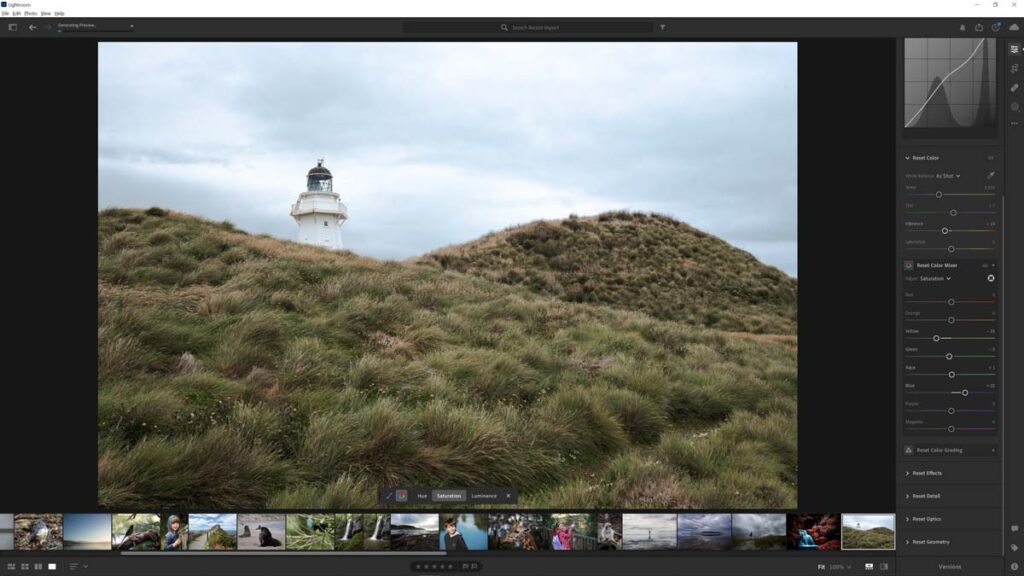
First of all, Lightroom’s photo management is excellent. Its face recognition works very well, and thanks to object recognition, you can search for photos featuring elements such as a dog, a building, or a waterfall. Furthermore, thanks to Lightroom’s integration with the Cloud, you can access your photo collection from your phone, tablet, or any computer with a regular web browser. Not only does this provide you with a consolidated view of your images, but it also makes sharing photos with family, friends, and clients a breeze.
Lightroom is extremely capable at editing your raw files and JPEGs. Beginners and anyone in a rush will appreciate Lightroom’s vast selection of presets, and enthusiasts will enjoy its well-presented, highly responsive interface. Feature-wise, Lightroom includes all the usual adjustments, plus one of the best noise-reduction tools, a reasonably capable upscaler, automatic subject masking, a background blur tool, HDR, and a panorama-stitching tool.
Yet we cannot talk about Lightroom without discussing subscriptions. Specifically, Lightroom costs US$11.99 a month when you sign up for a year. While this makes Lightroom a bad deal for some, it is a better deal than it initially appears. For an annual cost of US$144, you also get 1TB of cloud storage, which is worth about US$60 per year; therefore, Lightroom costs just US$84 per annum, and you’ll never have to pay for upgrades
But, price aside, Lightroom does have its rough edges. Critically, its interface cannot be customized, and its feature set will always be somewhat limited to maintain its distance from Photoshop. But, overall, I consider Adobe Lightroom the best all-rounder I’ve used. But if you don’t need or want the benefits the Cloud brings, Lightroom can look expensive, and you might want to consider similarly capable photo-editing applications that you can buy and own outright.
Read Lightroom Review for more information.
ACDSee Photo Studio
ACDSee Photo Studio is an excellent subscription-free alternative to Lightroom that you can buy outright for just US$99, making it one of photography’s biggest bargains.

Like Lightroom, ACDSee Photo Studio offers face-recognition-powered photo management and object-recognition-powered search, enabling you to search your collection for photos featuring things like sunsets, buildings, and birds. You can also use the excellent map view to geo-tag your images and browse your photos by where they were taken. Meanwhile, you can trade photos between your PC and Smartphone using the free ACDSee Share App.
ACDSee’s edit mode is one of my favorites. Its interface is highly customizable, well-presented, and responds to my inputs in real time. Many adjustments can be made directly to the image rather than using sliders, resulting in a more engaging user experience. There are also plenty of masking tools, including automatic masking of subjects, backgrounds, and skies. Moreover, stepping up from ACDSee Professional to Ultimate adds layer-based editing, an excellent portrait enhancement tool, and a terrible Sky Replacement feature.
But either way, ACDSee does have some rough edges. Peripheral functionality, such as HDR, AI Denoising, and Upscaling, is present but broadly inferior. Meanwhile, beginners might struggle with its busy interface and the poorly implemented Preset system.
Yet, overall, ACDSee Professional or Ultimate is well worth a look. Its photo management is excellent by any measure, and its editing mode is a pleasure to use. However, those of you looking for HDR, Sky Replacement, AI Noise reduction, and other modern-day ‘power’ features may prefer to look elsewhere.
Read my ACDSee Ultimate Review for more information
DxO Photolab
DxO PhotoLab is a responsive, well-equipped photo-editing application that combines two critical technologies to extract the best possible image quality from your files.

The first of these technologies is Optics Modules. Each module profiles the specific characteristics and flaws inherent in your chosen camera-lens combination to deliver precise corrections and enhancements, resulting in superior image quality. Then there’s DeepPRIME, which is as good a noise reduction gets and is akin to applying a sensor and lens upgrade to the photos you’ve already taken.
Regarding photo editing, DxO Photolab is well-presented, hyper-responsive, and equipped with all the usual tools, such as exposure, curves, and split tones. Meanwhile, beginners can take advantage of DxO Smartlighting and ClearView and edit their photos with minimal expertise.
However, you should not confuse DxO Photolab with a photo management tool. There’s no face recognition, geotagging, or a companion app for your smartphone. Moreover, DxO lacks now-commonplace features such as panorama stitching, HDR, sky replacement, and upscaling. Meanwhile, features such as creative vignette and luminosity masking are standard in many photo editing applications but only become available in Photolab when you buy DxO Filmpack, which is a bit mean given Photolab already costs US$239.
Overall, DxO Photolab is an excellent photo editing application built around two amazing technologies in Optics Modules and DeepPRIME noise reduction. But it is also true that for less money, you can buy photo studios with much broader feature sets. Yet, when it comes to image quality, anything other than DxO Photolab is a compromise.
Read DxO PhotoLab Review for more information.
Luminar Neo
Luminar Neo is the best photo editing application for beginners and experts in a rush, and is packed with simple, straight-to-the-point, effects-oriented tools such as Sky Enhance, Bokeh AI, and Skin AI that break down once-complex photo editing tasks into single clicks.

Nonetheless, it would be a mistake to consider Neo a lowbrow, beginner-only tool; you’ll still find traditional adjustments such as tone curves, exposure, and white balance. You can even apply effects layers and blend multiple images.
I’m also happy to report that Luminar Neo’s photo management has improved significantly. For instance, you can use Smart Search to find photos featuring elements such as birds, architecture, and water, and those who buy the Max package can host and share photo collections online with the Spaces feature. Meanwhile, the free Luminar Share app enables you to transfer photos between your phone and computer.
Of course, Luminar Neo has its sore points. It does demand decent hardware, and even then, larger, effects-laden edits can begin to slow down. It’s also the case that its AI-powered noise reduction, sharpening, and upscaling fall short of those of competing products, and despite improvements to photo management, there’s still no face recognition.
Nonetheless, Luminar Neo is one of the best photo-editing applications around and, certainly, the most beginner-friendly. It also has one of the most generous and interesting feature sets. While traditionalists may prefer the hands-on precision and responsiveness of other products, those seeking an easy and fast way to achieve outstanding results will love what Luminar No offers.
Read my Luminar Neo Review for more information
ON1 Photo Raw
ON1 Photo Raw is an all-in-one photo management and editing studio with an enormous feature set. For just US$99, you get Focus Stacking, HDR, a Portrait Enhancer, AI Noise Reduction, AI Sharpening, AI Upscaling, Object Recognition-powered masking, Geo Tagging, a mobile app, a Panorama stitching tool, Effects Layers, AI-adaptive Presets, Sky Replacement Tool, remote camera firing, Timelapse, and AI-powered keyword tagging.
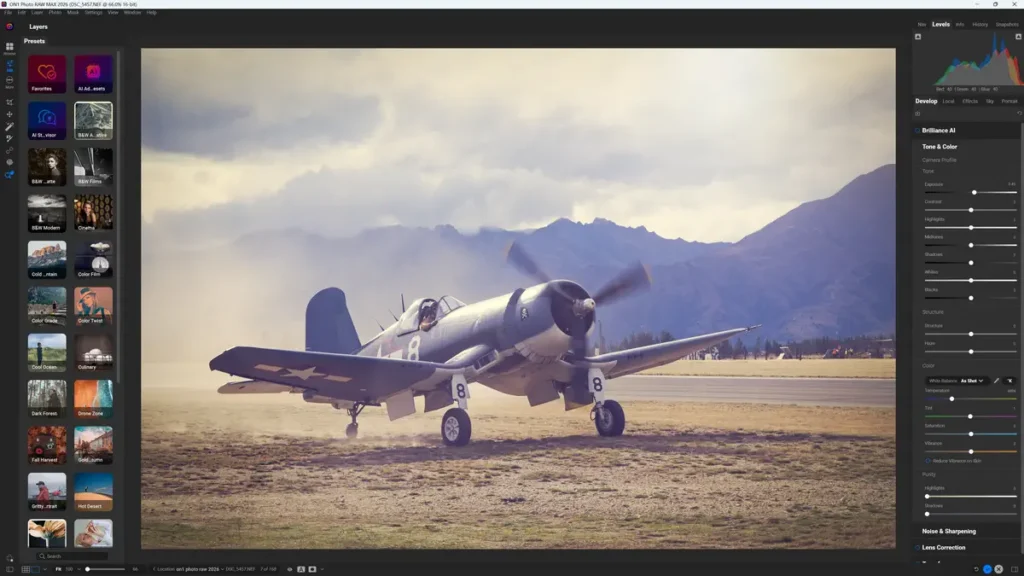
Remarkably, some of these features are top-tier. NoNoise AI is one of the best noise reduction tools I have tested, and I adore Photo Raw’s Effects layers and how they integrate with Super Select AI – ON1’s AI object recognition-powered masking. In contrast, other tools, such as the Resize AI upscaler, have fallen behind the best-in-class, but the fact that they are present in a US$99 product at all should not be taken for granted.
However, ON1 Photo Raw’s generous feature set does come with side effects. Specifically, its dense user interface and non-linear workflow are likely to turn some newcomers away, and some of its features feel better developed than others. For instance, NoNoise AI is outstanding, and Tack Sharp is very good, but you can’t reliably use them together, and the generative AI features range from unreliable to awful.
Yet, make no mistake, ON1 Photo Raw’s feature set makes it vastly more capable than non-layer-based alternatives such as Lightroom, and once you’re used to its interface, you may come to appreciate its underlying logic and flexibility. Overall, ON1 Photo Raw costs very little but demands your time. Those who ascend its initially steep-but-brief learning curve will find a highly capable photo-editing application with a massive creative envelope.
Read ON1 Photo Raw Review for more information
Honourable Mentions
Photoshop
Photoshop is easily the most capable photo editing application in the World. However, being capable doesn’t make Photoshop the best. For instance, Photoshop comes with a steep price and an even steeper learning curve – and you don’t need to tolerate either when it comes to many routine photo editing tasks. But, if you’re looking for the most advanced feature set, regardless of cost or learning curve, Adobe Photoshop is the way to go.
Capture One Pro
Capture One Pro was once my go-to photo editing application, and it remains excellent today. However, having tested so many of its rivals, I can’t determine why Capture One is so expensive. Some say it’s the best application for editing Fuji X-Trans files, while professional photographers will appreciate its remote camera tethering modes. But, in most cases, you can get something just as good for less money.
Article Continues Below
Get Discounts on Photo Editing Software
Subscribe to my weekly newsletter and be notified of deals and discounts on photography software from ON1, Adobe, Luminar, and more. Spam Promise: Just one email a week, and there’s an unsubscribe link on every email.