Topaz Photo AI’s potent combination of top-tier photo upscaling, noise reduction, and sharpening makes it the most capable photo enhancement application I’ve ever tested. Unfortunately, while this is the best version of Photo AI to date, its cloud-powered services and features don’t go far enough to justify the price increase over previous versions. Nonetheless, Photo AI’s unmatched ability to correct and enhance critical photos keeps it in contention for some and essential for others. Jump to Conclusion
REVIEW CONTINUES BELOW

TOPAZ PHOTO AI
STARTING FROM
US$17/mo
OR TRY FOR FREE
Table of Contents
- What is Topaz Photo AI
- How much does Topaz Photo AI cost
- Topaz Photo AI Trial
- What does Topaz Photo AI do
- Is Photo AI any good
- Topaz Photo AI Alternatives
- Conclusion
- Frequently Asked Questions
- About the Author
What is Topaz Photo AI
Topaz Photo AI is an all-in-one photo enhancement and restoration studio for PC and Mac, enabling you to easily deblur, sharpen, enlarge, and denoise your photos. You can also use Photo AI to brighten your photos, erase unwanted photographic elements, and remove dust and scratches from your digitized prints.
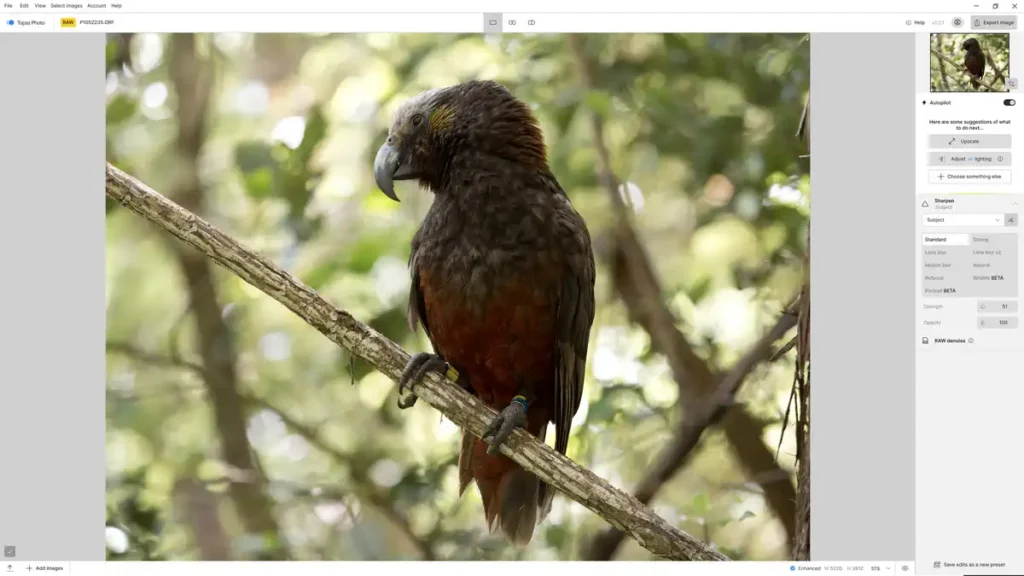
Critically, Photo AI requires very little skill to use. Its reliably excellent Autopilot mode assesses your photo and automatically applies whatever adjustments, enhancements, and restorations it thinks will best suit your image. However, you can always fine-tune Autopilot’s enhancements or turn it off altogether and make your own.
Topaz Photo AI works with both JPEG and a wide selection of Raw files. Once you have finished enhancing your image, you can export it as a TIFF, JPEG, or DNG Raw file. Furthermore, Photo AI is a standalone photo enhancement application, meaning it can operate independently of any other photography software. Alternatively, you can use Topaz Photo AI as a plugin for Lightroom Classic, Photoshop, Photoshop Elements, Capture One, and Apple Photos.
Photo AI is subscription-only and costs at least US$199 per year, depending on your payment plan. This includes the application itself and unlimited access to cloud-powered services such as Standard Max upscaling, accelerated Super Focus, and the Scratch and Dust removal tool. You can also try Topaz Photo AI free – no payment required. Try Topaz Photo AI Now – For Free
How much does Topaz Photo AI cost
Topaz Photo AI costs US$199 per annum or $21 per month when you commit to a single year. Alternatively, you can subscribe for $39 per month commitment-free. Note, you can no longer buy Photo AI outright for a one-time payment. Check the latest pricing and deals.
Topaz Photo AI Trial
Try Topaz Photo AI free. Download Free Trial Now
What does Topaz Photo AI do
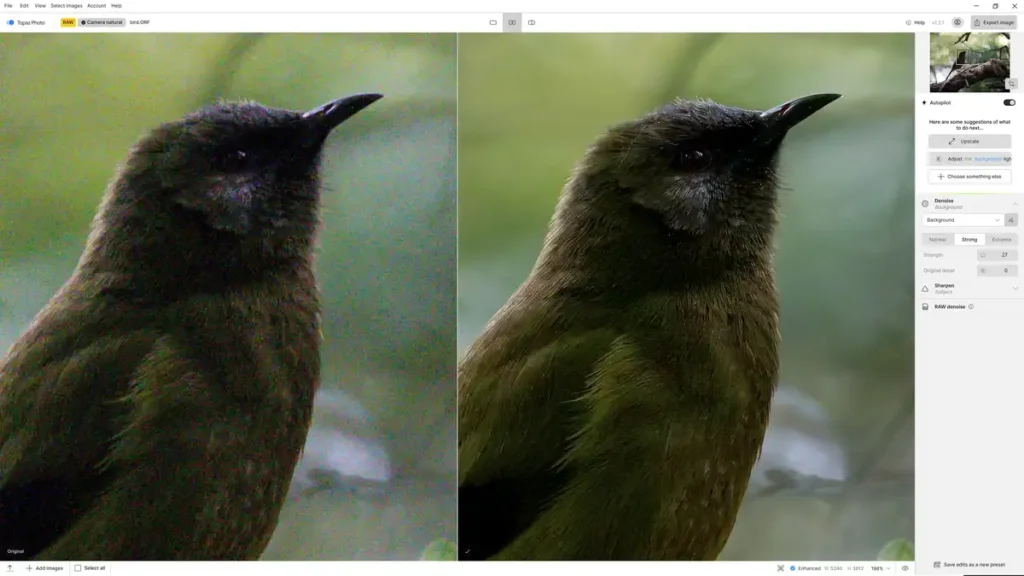
Topaz Photo AI is a photo enhancement studio. Specifically, you can denoise your noisy photos, correct poorly focused or motion-blurred images with artifact-free sharpening, and use AI to upscale and enlarge your pictures by up to 600%.
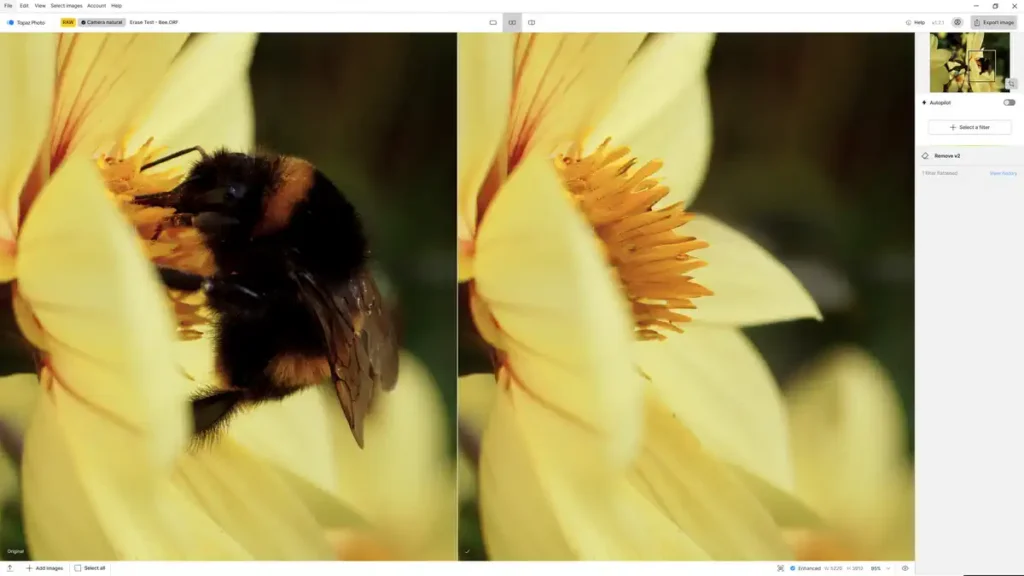
Moreover, Photo AI’s feature set has expanded in recent years. The Remove feature is one of the better AI-powered erase brushes I have tested, and the Cloud-powered Super Focus tool expands upon Photo AI’s ability to correct blurred images. Meanwhile, the Dust and Scratch removal tool does exactly that and works very well on poorly kept photos and scanned images.
Photo AI also includes a Face Recovery tool that enhances low-quality portraits while preserving natural features and skin tones. Ironically, there’s also a feature to add grain to your photo. Both the Adjust Lighting and Color Balance tools are most welcome, as they reduce the need to adjust your photo in a separate photo-editing application, saving time. Best of all, you can use all these features in tandem. For example, many applications can upscale a small photo or clean up a noisy image, but Photo AI is one of the few that can do both well.
Photo AI’s transition to a subscription model aligns with its increasing dependence on cloud technologies. While you can run most of Photo AI’s features on your own local hardware, recent features such as Super Focus, Standard MAX upscaling, and Dust and Scratch removal are so computationally taxing that you could end up waiting a very long time for the result. Thus, as a subscriber, you’ll be able to refer your renders to the Cloud and enjoy the benefits of Photo AI on less capable hardware.
Another blessing is Photo AI’s autopilot mode. With Autopilot enabled, Photo AI will assess your image and determine which adjustments it considers necessary. Moreover, you can run Autopilot on a whole batch of images with reliably excellent results. For this reason, Photo AI is well-suited for beginners or any enthusiast looking for a quick way to process a day’s worth of photos.
Is Photo AI any good
Each of Photo AI’s features is top-tier, and when combined, can produce results beyond the reach of any other application I have tested. The interface itself is responsive and well-presented, and your eyes might appreciate the inclusion of Light and Dark modes. The Autopilot feature is excellent, automatically enhancing single images and entire batches, delivering consistently excellent results without requiring your oversight.
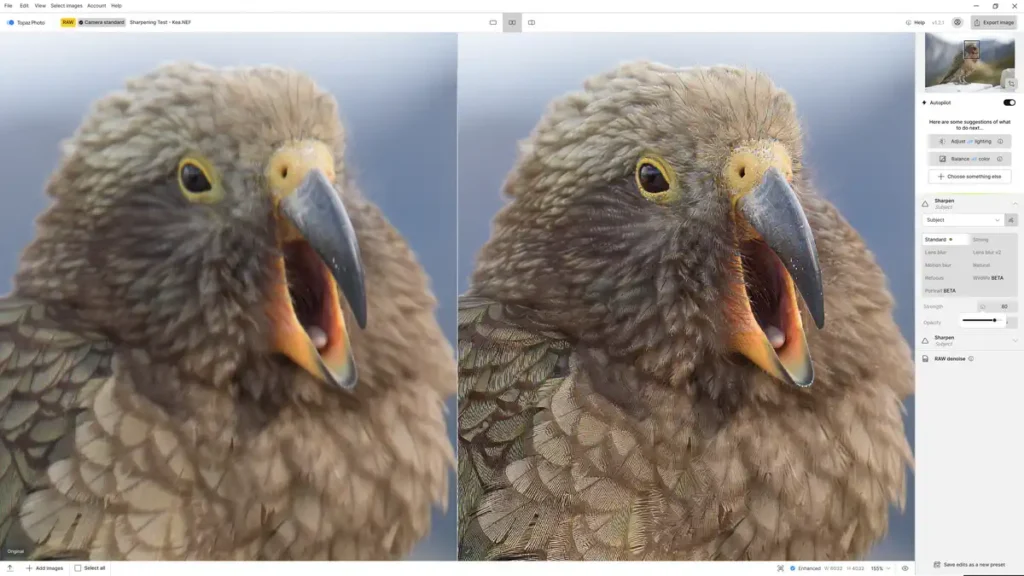
Yet, while the features are very good, the price makes assessing Photo AI more difficult than it used to be. Afterall, Photo AI once cost $199 to buy outright, and $119 to upgrade – assuming you wanted to upgrade at all. Of course, this isn’t a fair comparison, as this new subscription-only cloud-powered version of Photo AI delivers new features. Unfortunately, these new features fall short of compelling.
For instance, Super Focus can produce superior results, but it can also fall short of Photo AI’s standard sharpening. Likewise, I’ve found the original Standard Upscaling model to outperform the Cloud-powered Standard Max version. While I like the Dust and Scratch removal tool, not everyone needs it, and I’ve fed Wonder numerous photos, and I’ve yet to determine what it’s uniquely good for. Moreover, the cloud rendering service has taken a step back. In Topaz Photo AI 4, you can assign multiple images to the cloud render queue, enabling you to work while you wait. Now, the application locks up and keeps you waiting until the Cloud render is complete.
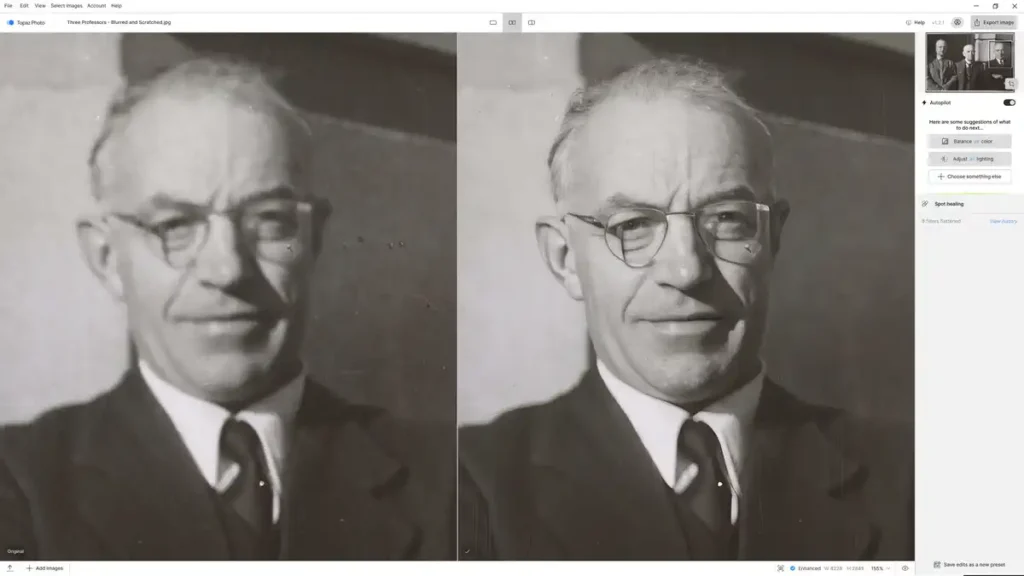
In other words, as capable as these cloud-powered features are, I believe they need to be substantially and consistently better than Photo AI’s legacy enhancements. And well, they’re just not. Ultimately, they fall short of demonstrating the supposed superiority of the Cloud and, as a result, the necessity of a subscription and the increased cost.
Yet, make no mistake, Photo AI’s quality is unquestionably excellent. Yet, the shift to a cloud-powered subscription model has increased its price without delivering a proportionate increase in value. But if you need the best all-in-one image enhancement application on the market, well, here it is.
Topaz Photo AI Alternatives
No application matches Photo AI in its entirety. However, many applications can replace some of it. ON1 Photo Raw gets closest. Specifically, its NoNoise AI’s noise reduction is actually superior, while its upscaler, Resize AI, isn’t too far behind. Meanwhile, Photo Raw’s TackSharp is a pretty good deblurring tool, but it falls significantly short of Photo AI and doesn’t work well with noise reduction.
Alternatively, Luminar Neo has an excellent photo restoration mode, and its AI Erase brush is at least as good as Photo AI’s Remove feature. However, Neo’s Supersharp, Upscale AI, and Noiseless AI fall well short of their Photo AI equivalents and don’t always work well together. Unsurprisingly, Photo AI’s stablemate, Gigapixel, offers equally excellent upscaling, but given the cost difference, you might as well go for Photo AI.
Lightroom offers comparable AI noise reduction, but Super Resolution can’t get near Photo AI’s upscaling. DxO PureRaw is a superior denoising tool and can even correct lens softness. But that’s about it.
Overall, there are plenty of applications that can serve as substitutes for specific Photo AI features. But none do it all and often, not as well.
Get Discounts on Photo Editing Software
Subscribe to my weekly newsletter and be notified of deals and discounts on photography software from ON1, Adobe, Luminar, and more. Spam Promise: Just one email a week, and there’s an unsubscribe link on every email.
Conclusion
Topaz Photo AI is a formidable image enhancement application that blends first-rate noise reduction, sharpening, and upscaling into a single, easy-to-use application. Simply speaking, it’s the best all-in-one photo enhancement application I’ve tested.
However, it is impossible to ignore the price shift. What once cost $199 outright now costs $199 every year, and Photo AI’s cloud-powered features are not sufficiently superior to justify the new price. For instance, Super Focus can be slightly better than standard sharpening, but it can also be worse; the same applies to Standard and Standard MAX upscaling. While I’m impressed with the Dust and Scratch removal tool, it’s a bit too niche to shift the cost-value proposition on its own. Critically, features such as Dust and Scratch and Super Focus could be purchased outright in Topaz Photo AI 4, though you did have to pay extra if you wanted to render them in the Cloud.
Yet, regardless of price, Photo AI remains at the top of its game. When reviewed individually, each of Photo AI’s features can be considered top-tier, and best of all, they all work well together to produce compound enhancements beyond the reach of any other application I have tested.
To sum up, I can confirm that Photo AI is rather expensive and offers poor value relative to its bought-outright predecessors. Nonetheless, this is the best version of Photo AI yet, and nothing else can really match it. Therefore, if you need the best possible result, close your eyes, think happy thoughts, and click subscribe. Try Topaz Photo AI Now – For Free
Get more
Subscribe to my weekly email and receive deals and discounts on Topaz Photo AI and other photography gear and software. Subscribe Now.
TOPAZ PHOTO AI
STARTING FROM
US$17/mo
OR TRY FOR FREE
Frequently Asked Questions
No. While Topaz Photo AI does include Gigapixel-like upscaling, it lacks Gigapixel-exclusive features such as Recover and Redefine. However, when it comes to standard upscaling, Gigapixel and Photo AI deliver similarly excellent results.
Topaz Photo AI is free for 30 days. After which, Photo AI will cost you a one-time payment of US$199 for a single lifetime license.
No. Photo AI is subscription-only.
You can try Topaz Photo AI for free for 30 days – no payment required.
Yes. Topaz Photo AI can open and process JPEG files. It can also export processed Raws as JPEGs.
Yes. Both Topaz Denoise AI and Sharpen AI are discontinued, with their feature sets transferred to Topaz Photo AI.
Topaz Photo AI and Gigapixel produce near-identical results when upscaling good-quality images. However, Photo AI is better at upsampling blurred and noise-ridden images thanks to its expanded feature set.
Yes. Lightroom Classic. However, Topaz Photo AI can also work standalone, independent of other photography software.
About the Author

Related Reading
DxO PureRaw 6 Review – Return of the King
Topaz Photo AI Review – Subscription Hurts Value
Luminar Neo Review – Never Better but Flaws Persist
DxO FilmPack 8 Review – Glorious Imperfection
ON1 Photo Raw Review 2026 – Edging Towards Perfection